 Download more informationMore info
Sign in
Download more informationMore info
Sign in
Watch the broadcast
The operating room, always close
Vidicap in two minutes
We'll show everything Vidicap can do in pictures. You don't have to press anything: the tour plays by itself.
All names and numbers here are made up. There are no real patients in this tour.
The idea
The operation happens here. You can watch from anywhere.
A colleague in another city, students in a lecture hall, a consultant at home: everyone sees the operation live, as if standing next to the table.
Device
Vidicap is a touch screen in the operating room
Cameras plug into it. Big tiles, like on a phone: live, recording, cameras — one touch, even in gloves.
Touch 2.0 is the new model. Touch 1.0 is the screens already installed: they get the same new features, and updates make them faster and more reliable.
At the top of the screen is the operation timer: it starts with one tap and keeps counting even if the Vidicap restarts.
A PTZ camera is a separate module, «Camera control», on Touch 1.0 and Touch 2.0: its tile appears only where the room has a camera.
New examination
RFID badge sign-in
Tap the badge and the doctor is in the examination
A doctor or assistant holds their badge to the Vidicap reader, and their name appears in the new examination by itself. No searching for yourself in a list on the screen.
The staff list and their tags are stored on the Vidicap itself. A technician turns it on. For Touch 2.0 and Touch 1.0.
- Dr. Petrov Great view!
- Student Which instrument is that?
- Surgeon Let me zoom in 👍
Patient vital signs10 min20 min30 min2 h6 h
Alarms: none · Other parameters · Devices: online
Broadcast
Press “Live” and colleagues are already watching
The video goes to a browser on a phone or computer. Viewers type in the chat or talk to the surgeon by voice right from the browser: a two-way conversation, nothing to install.
Only invited people can watch. A guest just needs the link, no account.
Right under the video are the patient's vital signs: live numbers, trends for 10, 20 or 30 minutes, 2 or 6 hours, alarms and HL7 devices. No patient name.
Shared rooms
Several operating rooms on one screen
For conferences and seminars: three operating rooms and a lecturer in one broadcast. The host puts the main picture up with one tap, the rest go into small windows.
Telegram
The invitation arrives in Telegram
Nothing to install. A message arrives, you press “Watch”, and the broadcast opens right in Telegram.
⚠ Alarm Pulse: above limit
Patient monitor→Vidicap screen and platform
Trends10 min20 min·Values and charts
Patient vital signs
Pulse, blood pressure and oxygen — next to the video
The patient monitor sends its numbers to Vidicap over the network by itself. Nobody copies anything, and the consultant sees both the operation and how the patient is doing.
On the Vidicap screen, trends for 10 or 20 minutes. On the platform, the numbers are shown next to the operating room broadcast, and the «Values and charts» page has charts, without the patient's name.
A monitor alarm pops up over any Vidicap screen, on Touch 1.0 and Touch 2.0, in plain words.
For technicians: HL7 standard, Mindray and other patient monitors and anaesthesia machines. The port and the monitor network are set right on the Vidicap screen, no computer needed.
Slide your finger along the chart 👆
Study archive
Operation video and vitals on one timeline
After the operation you can see what was on screen the very second the blood pressure dropped. Handy for case reviews and teaching.
Recordings are kept on the hospital server.
Module: DICOM viewer
CT and MRI right in the operating room
Patient images from a USB stick, a disc or the hospital PACS open on the Vidicap screen. CT and MRI are shown in 3D: three planes and a volume you can rotate.
Works the same on Touch 2.0 and Touch 1.0. Images stay in the hospital.
Compressed CT and MRI (JPEG 2000 and other formats) open too. On MRI series the «Organs (AI)» button outlines the organs in 3D.
Modules: surgical light and table
Surgical light and table from the same screen
Light brightness and table position change with a touch, no need to send a nurse to the remote. Try it yourself.
Two separate add-on modules: “Surgical light” (Mindray HyLED) and “Surgical table” (Mindray HyBase). Take one or both.
Tap a source, then a screen 👆
Module: video routing
Any picture on any screen
Endoscope to the surgeon's monitor, X-ray to the big screen, everything into the recording. Switched from the Vidicap screen, no cables or remotes.
For FSN IPS4000 and IPS1000A video matrices: the model is chosen in «Settings» → «Video routing», on Touch 1.0 and Touch 2.0.
External display
Module: video output
An external display with no extra hardware
The display plugs straight into the Vidicap with a cable. With one tap the doctor chooses what it shows: a camera, two cameras side by side, video with the patient's vitals, AI endoscopy or a DICOM image.
TVs and video walls on the hospital network can also watch the stream over SRT. For Touch 2.0 and Touch 1.0.
Module: music
Your own music in the operating room
The team plays music from a phone and it comes out of the operating room speakers: iPhone over AirPlay, Android and iPhone over Bluetooth, or internet radio from the Vidicap screen.
When a consultant or the assistant speaks, the music turns down by itself. It never gets into recordings or the broadcast. For Touch 2.0 and Touch 1.0.
Room systems
Module: room engineering
Room lights, climate and door sign in one tap
A scene sets the whole room: main lights, blinds, ventilation, the sign over the door. «Endoscopy» dims the lights so there is no glare on the screen, and can switch on by itself when AI endoscopy is opened.
Through a LogicMachine controller (KNX, Modbus, BACnet). Medical gases and emergency power are display-only on the Vidicap. For Touch 2.0 and Touch 1.0.
Endoscopic camera
Insufflator
Pressure 12 / 12 mmHg Flow 8 / 20 L/minModules: endoscopy camera and insufflator
The endoscopy tower is controlled from the Vidicap screen
Snapshot, white balance, freeze and light brightness are on the same screen as the recording. Gas pressure and flow from the insufflator are shown next to them, and if the pressure stays above the set value, the tile turns red.
Mindray tower (UX camera with light source, HS-50F insufflator) through the Vidicap MD2 Bridge program. The insufflator is display-only and cannot be controlled. For Touch 2.0 and Touch 1.0.
Module: web access
One operating room? No server needed
Vidicap itself works as a website on the hospital network. Open its address in a browser on any computer in the department and everything is at hand.
In the «Study archive», the video, photos and trends of every operation open right in the browser, exactly as they are on the Vidicap disk. For Touch 1.0 and Touch 2.0.
Hospital platform
Many operating rooms, one hospital server
All the hospital's Vidicaps meet on its own server: broadcasts, recordings, monitor readings, doctors' accounts. Works even without the internet.
Ward monitors→Vidicap Connect→Hospital HIS
Vidicap Connect: department monitors
Ward monitors send their readings to the hospital system by themselves
Intensive care, wards, admissions: Vidicap Connect on the hospital server receives monitor readings and alarms, sorts them by department and bed and passes them to the hospital information system. If the link drops, the data waits in a queue.
Doctors see every bed on the «Wards» screen: vitals, the NEWS2 score and live ECG, pulse oximetry and respiration waveforms. An alarm highlights the bed, and a tap opens its trends, events and the waveform at the moment of the alarm.
HL7 standard, up to 1000 monitors. The patient's name can be stripped for each receiver. Everything stays inside the hospital.
Server tree
Buildings, hospital and cloud: one tree
A building's server links to the hospital server with a code, and that one to the cloud or to another server. From the top you see the whole tree: which servers and Vidicaps are online and whose version is behind. Vidicap updates and licences flow down the tree from the cloud by themselves: servers below only need a link to the level above.
A building's operating room broadcast goes up the chain to the hospital server and on to the cloud only while someone is watching; recordings stay where they are. The hospital server's administrator decides which points are visible in the cloud. Connect wards of other buildings are visible live on the hospital server, and a doctor can mark an event right there. Loops in the tree are not allowed.
Vidicap checkOperating room 2 · Touch 1.0
- 1080p video recordingWorks
- BroadcastWorks
- External displayWorks
- DICOMNo 3D
- AI endoscopyAI server needed
- MusicCan be installed
↻ Check now
Vidicap check
See in advance what each Vidicap can handle
Vidicap tests itself under a real operating-room load and answers for every function and module: works, works with a limit, or what to buy. Even for modules not installed yet.
On the platform, «Fleet check» collects the answers of every Vidicap in the hospital, and the «Check now» button runs the check again for all of them or for one. A Vidicap busy with an operation checks itself once it is free. For Touch 2.0 and Touch 1.0.
Privacy
Patient data never leaves the hospital
Names, medical records, readings and recordings are kept only on the hospital's servers. The vidicap.cloud only helps doctors open a broadcast and call a colleague for help.
Module: AI endoscopy
Artificial intelligence watches alongside the doctor
During an endoscopy, a neural network outlines on screen what is worth checking: a polyp, bleeding, an ulcer. It is a hint; the doctor always decides.
Runs inside the hospital: on Touch 2.0 right on Vidicap; on Touch 1.0 on the device itself if «Vidicap check» showed it can cope, otherwise via Vidicap AI Server. Frames are not sent anywhere.
Module: AI ultrasound · research
AI helps read breast ultrasound
The neural network looks at the ultrasound machine's image and outlines areas worth a closer look. It is a hint for the doctor, not a diagnosis: the module is still in research status.
In «AI endoscopy» the network marks polyps, and in DICOM the «Organs (AI)» button colours organs on MRI. On Touch 1.0 the network runs on the device itself if the check showed it can cope, otherwise via Vidicap AI Server. The name and date on the machine's screen are cropped off, and frames are not sent anywhere.
- 1A doctor outlines a finding
- 2An expert reviews it
- 3A new model on the Vidicap
AI training on vidicap.cloud
Doctors teach the neural network themselves
A doctor uploads their own videos and photos and outlines findings right in the browser; an expert reviews them. Approved examples build a new model, which reaches the Vidicap with one button.
Names and dates are cropped off on the doctor's own computer: only de-identified frames reach the platform. Accounts are by invitation.
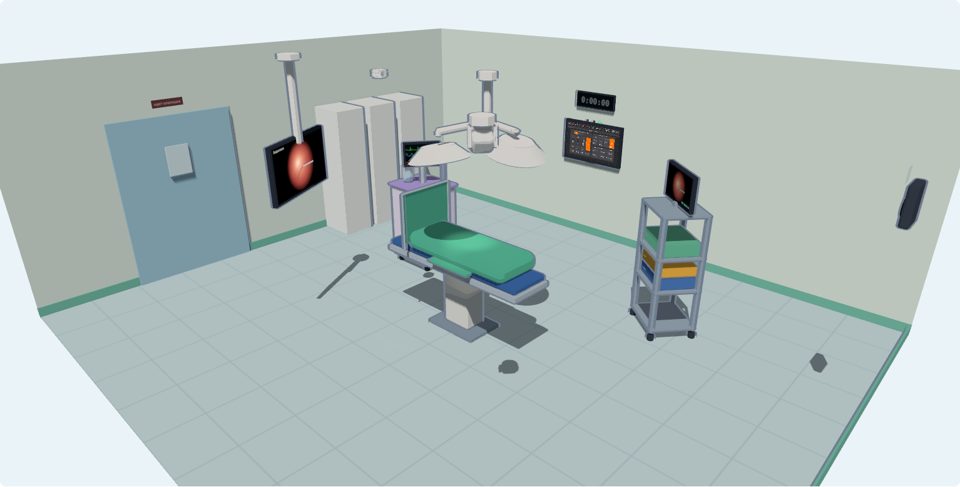
On the platform
Vidicap right in your browser
After signing in to the platform you get the real Vidicap screen: record an examination, browse the files and try every add-on module, from the light and table to music and the voice assistant. No device needed, for training and checks.
Next to it, a 3D operating room: the Vidicap on the wall, surgical lights, table, patient monitor, camera, tower and the sign over the door repeat everything you do. The patient and numbers are made up, nothing is sent anywhere.
«Hey Vidicap! Lights on.»
«Turning the lights on.»
«Get everything ready for the operation.»
Vidicap Assistant · in development
Say it and Vidicap does it
A voice assistant for the operating room: lights, cameras, recording — by voice, hands stay sterile. Works offline, the voice is never stored.
The operating room, always close
- Live
- Rooms
- Telegram
- Patient
- RFID badge sign-in
- Archive
- Light & table
- Video to screens
- External display
- Music
- Room systems
- Endoscopic camera
- Insufflator
- Web access
- Hospital server
- Vidicap Connect
- Server tree
- Vidicap check
- DICOM
- AI endoscopy
- AI ultrasound
- Emulator
Demo. All data is made up.